How to Get Started with Microsoft Azure

azure-icon-250x250

image courtesy of Microsoft.com

A few months ago I wrote an article on getting started with Amazon Web Services (AWS): now I wanted to follow-up by writing the same about Microsoft Azure. Microsoft Azure is the public cloud offering deployed through Microsoft’s global network of datacenters. Azure has continued to gain market share from its chief rival, AWS. Being in second place is not something Microsoft is used to with their offerings. However, in the cloud, like with internet web browsers, Microsoft got off to a slow start. Capturing market share will not prove as simple with AWS as it was with Netscape and the web browser market in the 90’s but in the last two years, progress has been made. Much of the progress can be attributed to Satya Nadella, Microsoft’s current CEO.  Nadella proclaimed from his start a commitment to the cloud. Most recently Microsoft has expressed their commitment to support Linux and other operating systems (OS) within Azure. Embracing another OS and open source projects is new for Microsoft and seems to be paying off.

Like the other large public cloud providers, Microsoft has an easy to use self-service portal for Azure that can make it simple to get started. In addition to the portal, Microsoft entices small and new users with a free month of service. The second version of the portal released last year has improved the user experience greatly. Their library of pre-configured cloud instances is one of the best in the market. A portal user can select a preconfigured group of servers that would create a complex solution like SharePoint. The SharePoint instance includes all the components required: The Windows Server, SQL Server and SharePoint Server. What would take hours previously now can be “spun-up” in the cloud with a few clicks of your mouse. There are dozens of pre-configured solutions such as this SharePoint example. The greatest advantage Microsoft has over its cloud rivals is it has a deep and long-established channel of partners and providers. These partners, and the channel Microsoft developed for their legacy products, allow them to provide the best support of all the public cloud offerings.

Considerations for Getting Started with Microsoft Azure

  1. Decide the type of workload– It is very important to decide not only what workloads can go to the cloud but also what applications you want to start with. Start with non-production applications that are non-critical to the business.
  2. Define your goals and budget– Think about what you want to achieve with your migration to the cloud. Cost savings? Transferring IT from the capital expense to an operational expense? Be sure you calculate your budget for your cloud instance; Azure has a great tool for cost estimation. In addition, make sure you check costs as you go. The cloud has developed a reputation for starting out with low-costs and increasing them quickly.
  3. Determine your user identity strategy– Most IT professionals are familiar with Microsoft Active Directory (AD). This is Microsoft’s application that authenticates users to the network behind the corporate firewall. AD has become somewhat outdated, not only by cloud’s off-site applications but also by today’s limitless mobile devices. Today, Microsoft offers Azure Active Directory (AAD). AAD is designed for the cloud and works across platforms. At first, you may implement a hybrid approach between AD, AAD and Office 365 users. You can start this hybrid approach through a synchronization of these two authentication technologies. At some point, you may need to add on federation that will add additional connectivity to other applications such as commonly used SaaS applications.
  4. Security– An authentications strategy is a start for security but additional work will need to be done. A future article will detail cloud security best practices in more detail. While it is always best to have a security expert to recommend a security solution, there are some general best practices we can mention here. Try to use virtual machine appliances whenever possible. The virtual firewall, intrusion detection, and antivirus devices add another level of security without adding additional hardware. Devices such as these can be found in the Azure marketplace. Use dedicated links for connectivity if possible. These will incur a greater expense but will eliminate threats from the open Internet. Disable remote desktop and secure shell access to virtual machines. These protocols exist to offer easier access to manage virtual machines over the internet. After you disable these try to use point to point or site to site Virtual Private Networks (VPN‘s). Finally, encrypt all data at rest in virtual machines to help secure data.

Practically every business can find applications to migrate to a public cloud infrastructure such as Azure. Very few businesses put their entire IT infrastructure in a public cloud environment. A sound cloud strategy, and determining which applications to migrate enables the enterprise to get the most from a public cloud vendor.

If you would like to learn more about Azure and a cloud strategy for your business contact us at:

Jim Conwell (513) 227-4131      jim.conwell@twoearsonemouth.net

www.twoearsonemouth.net


Three Reasons to Use a Local Datacenter and Cloud Provider

Cincinnati-dc

photo courtesy of scripps.com

Now that the business cloud market has matured, it has become easier to recognize the leaders of the technology as well as the providers that make the most sense to partner with your business. Many times that can be a local datacenter and cloud provider. There are many large public cloud providers and most agree on three leaders:  Amazon Web Services (AWS), Microsoft Azure and Google Cloud. Google has been an uncharacteristic laggard in the space and seems to be struggling with the Business to Business model (B2B). Clearly, a B2B strategy can evolve from Business to Consumer (B2C) strategy, one can look no further than the public cloud leader AWS.

Whether Google Cloud can succeed is unclear. What is clear, however, is that there will always be a place for large public cloud providers. They have fundamentally changed how IT in business is done. The mentality the public cloud help to create, “go fast and break things“, has been an important concept for the enterprise IT sandbox.

Where Does the Local Data Center Fit in?  

I also believe there will always be a place in business IT for the local data center and cloud provider. The local data center and cloud provider mentioned here is not an engineer putting a rack up in his basement, or even the IT service provider whose name you recognize hosted in another data center. The local data center I am referencing has been in business many years, most likely before the technology of “cloud” was invented. My hometown in Cincinnati, Ohio has such a respected data center, 3z.net. 3z has been in business for over 25 years and offers its clients a 100% uptime Service Level Agreement (SLA). It has all the characteristics a business looks for in an organization it trusts its data with: generator, multiple layers of security, and SOC II level of compliance. It uses only top tier telecom providers for bandwidth and its cloud infrastructure uses technology leaders such as Cisco and VMware.  Most of all, 3z is easy to do business with.

To follow are three primary reasons to use a local datacenter.

Known and Predictable Cost-

The local data centers’ cloud cost may appear more expensive on the initial cost evaluation; however, they are often less expensive in the long run. There are many reasons for this but most often it is based on the rate charged for transmitting and receiving data to your cloud. Large public clouds charge fees based on the gigabyte of outbound data. While it is pennies per gigabyte, it can add up quickly. With the per gigabyte charges, the business doesn’t know all their costs up front. The local datacenter will typically charge a flat fee for monthly bandwidth that includes all the data coming and going. This creates an “all you can eat” model and a fixed cost.

Customized and Increased Support for Applications-

Many of the applications the enterprise will use cloud may require customization and additional support from the cloud provider. A good example of this is Disaster Recovery (DR) or Disaster Recovery as a Service (DRaaS). DRaaS requires a higher level of support for the enterprise in the planning phases as most IT leaders have not been exposed to DR best practices. Additionally, the IT leaders in the enterprise want the assurance of a trusted partner to rely on in the unlikely event they declare an emergency for DR. In many of the local cloud provider and datacenters I work with, the president of the datacenter will happily provide his private cell phone number for assistance.

Known and Defined Security and Compliance-

Most enterprise leaders feel a certain assurance of knowing exactly where their data resides. This may never change, or at least not to an IT auditor. Knowing the location and state of your data also helps the enterprise “check the boxes” for regulatory compliance. Many times, the SOC certifications are not enough, more specific details are required. 3z in Cincinnati will encrypt all of your data at rest as a matter of their process. Additional services like these can ease the IT leader’s mind when the time for an audit comes.

It is my opinion that the established local datacenter will survive, and flourish.  However, it may need to adjust to stay relevant and competitive with the large public cloud providers. For example, they will need to emulate some of the popular public cloud offerings such as an easy to use self-service portal and a “try it for free” cloud offering. I believe the local datacenter’s personalized processes are important and I offer support for 3z and its competitive peers to prosper in the future.

If you would like to learn more or visit 3z please contact us at:

Jim Conwell (513) 227-4131      jim.conwell@twoearsonemouth.net

www.twoearsonemouth.net

3 Reasons to Use Your Hometown’s Datacenter and Cloud Provider

Cincinnati-dc

photo courtesy of scripps.com

Now that the business cloud market has matured, it has become easier to recognize the leaders of the technology as well as the providers that make the most sense to partner with your business. There are many large public cloud providers and most agree on three leaders:  Amazon Web Services (AWS), Microsoft Azure and Google Cloud. Google has been an uncharacteristic laggard in the space and seems to be struggling with the Business to Business model (B2B). Clearly, a B2B strategy can evolve from Business to Consumer (B2C) strategy, one can look no further than the public cloud leader AWS.

Whether Google Cloud can succeed is unclear. What is clear, however, is that there will always be a place for large public cloud providers. They have fundamentally changed how IT in business is done. The mentality the public cloud help to create, “go fast and break things“, has been an important concept for the enterprise IT sandbox.

Where Does the Local Data Center Fit in?  

I also believe there will always be a place in business IT for the local data center and cloud provider. The local data center and cloud provider mentioned here is not an engineer putting a rack up in his basement, or even the IT service provider whose name you recognize hosted in another data center. The local data center I am referencing has been in business many years, most likely before the technology of “cloud” was invented. My hometown in Cincinnati, Ohio has such a respected data center, 3z.net. 3z has been in business for over 25 years and offers its clients a 100% uptime Service Level Agreement (SLA). It has all the characteristics a business looks for in an organization it trusts its data with: generator, multiple layers of security, and SOC II level of compliance. It uses only top tier telecom providers for bandwidth and its cloud infrastructure uses technology leaders such as Cisco and VMware.  Most of all, 3z is easy to do business with.

To follow are three primary reasons to use a local datacenter.

  1. Known and Predictable Cost- The local data centers’ cloud cost may appear more expensive on the initial cost evaluation; however, they are often less expensive in the long run. There are many reasons for this but most often it is based on the rate charged for transmitting and receiving data to your cloud. Large public clouds charge fees based on the gigabyte of outbound data. While it is pennies per gigabyte, it can add up quickly. With the per gigabyte charges, the business doesn’t know all their costs up front. The local datacenter will typically charge a flat fee for monthly bandwidth that includes all the data coming and going. This creates an “all you can eat” model and a fixed cost.
  2. Customized and Increased Support for Applications- Many of the applications the enterprise will use cloud may require customization and additional support from the cloud provider. A good example of this is Disaster Recovery (DR) or Disaster Recovery as a Service (DRaaS). DRaaS requires a higher level of support for the enterprise in the planning phases as most IT leaders have not been exposed to DR best practices. Additionally, the IT leaders in the enterprise want the assurance of a trusted partner to rely on in the unlikely event they declare an emergency for DR. In many of the local cloud provider and datacenters I work with, the president of the datacenter will happily provide his private cell phone number for assistance.
  3. Known and Defined Security and Compliance- Most enterprise leaders feel a certain assurance of knowing exactly where their data resides. This may never change, or at least not to an IT auditor. Knowing the location and state of your data also helps the enterprise “check the boxes” for regulatory compliance. Many times, the SOC certifications are not enough, more specific details are required. 3z in Cincinnati will encrypt all of your data at rest as a matter of their process. Additional services like these can ease the IT leader’s mind when the time for an audit comes.

It is my opinion that the established local datacenter will survive, and flourish.  However, it may need to adjust to stay relevant and competitive with the large public cloud providers. For example, they will need to emulate some of the popular public cloud offerings such as an easy to use self-service portal and a “try it for free” cloud offering. I believe the local datacenter’s personalized processes are important and I offer support for 3z and its competitive peers to prosper in the future.

If you would like to learn more or visit 3z please contact us at:

Jim Conwell (513) 227-4131      jim.conwell@twoearsonemouth.net

www.twoearsonemouth.net

Should We Eliminate or Embrace Shadow IT?

shadowit_image

With cloud computing’s acceptance in business coupled with the ease of entry and setup with public cloud offerings, the terminology of Shadow IT has reemerged. Wikipedia defines Shadow IT as “a term often used to describe information-technology systems and solutions built and used inside organizations without explicit organizational approval”.

If the cloud initiated this reemergence, the Internet of Things (IOT) and the Bring Your Own Devise (BYOD) phenomenon’s have exacerbated it. When employees started bringing their mobile phones and tablets to the office they began integrating applications they used in their personal life to business. Likewise, Machine Learning (ML) applications have influenced corporate IT and its guidelines throughout the enterprise. Opponents say Shadow IT challenges the IT governance within the organization. What may appear to be a disadvantage to the IT department may be advantageous to the company. To follow are some of the advantages and disadvantages of shadow IT.

Advantages

  • Increased agility – departments within an organization can create their own IT resources without depending on the lag time and processes of the IT department.
  • Empowering employees – employees will be more productive when they feel they have the power to make decisions, including IT selections, on their own.
  • Increased creativity – putting the process of creating IT resources in the hands of the user often creates a better product and experience for that user.

Disadvantages

  • Security – Employees outside the IT department rarely consider security when implementing IT services.
  • Cost- When IT resources can be implemented at the employee level, as opposed to being purchased centrally, there will be wasted resources.
  • IT governance and compliance –Outside of the IT department, purchasers will not consider the regulatory concerns and governance. Processes and rules for IT need to be in place regardless if the resources are centrally implemented.

IT departments are not wrong to have contempt for the concept of Shadow IT. However, we believe they can learn to work with aspects of it. If a business can communicate across all departments and overcome the disadvantages listed above, we believe Shadow IT can be a win/win for the entire enterprise.

If you need assistance designing your evolution to the cloud or data center

please contact us at Jim Conwell (513) 227-4131      jim.conwell@twoearsonemouth.net      www.twoearsonemouth.net

 

Ohio Datacenter with AWS Direct Connect Now Open

cologix

Datacenter Trends

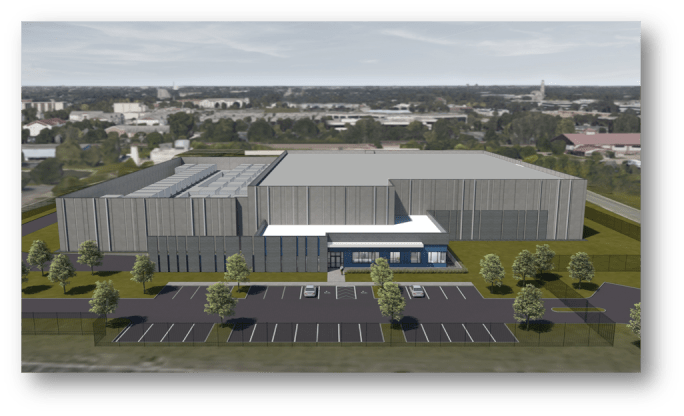
It’s beginning to feel more like the Silicon Valley in Central Ohio. There is now an Ohio Datacenter with AWS Direct Connect If you haven’t seen or heard about the new Cologix datacenter, take a minute to read on.

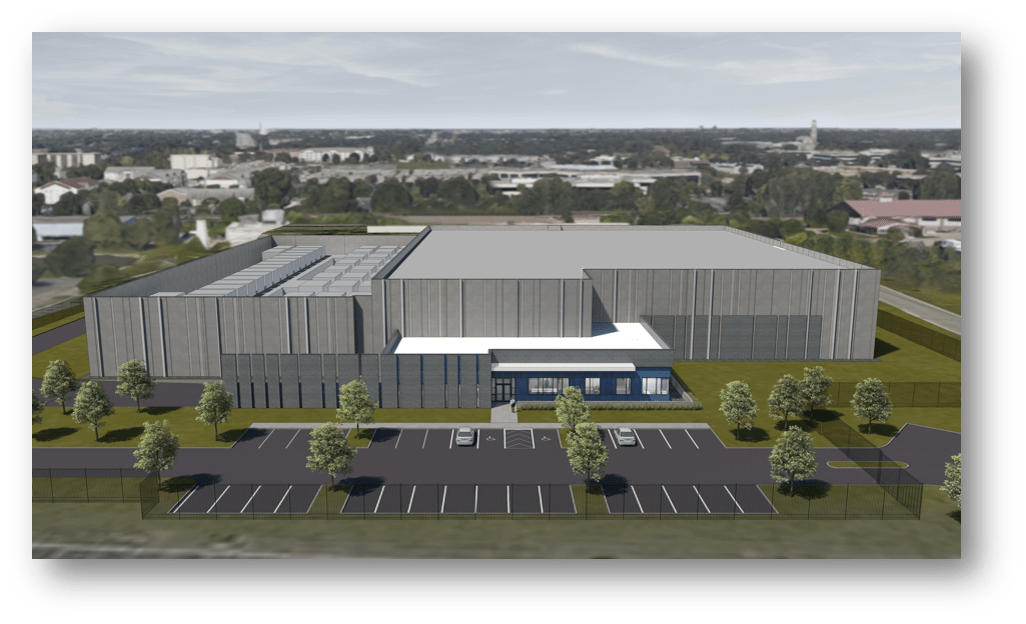
Cololgix datacenter has been in the Columbus area for many years and operates 27 network neutral datacenters in North America. Its newest facility, COL3, is the largest multi-tenant datacenter in Columbus and resides on the same 8-acre campus as their existing datacenters COL1 and COL2. It offers over 50 network service providers including the Ohio-IX Internet Exchange peering connection.

Most exciting of all is its 20+ cloud service providers, which includes a direct connection to the market leading Amazon Web Services (AWS). This is the first AWS direct connection in the region providing customers with low latency access to AWS US East Region 2. With direct connect AWS customers create a dedicated connection to the AWS infrastructure in their region. When AWS is in the same datacenter where your IT infrastructure resides, such as Cologix, all that is needed for connectivity is a small cross connect fee.

Here are some pertinent specifications of Cologix COL3:

Facility

    • Owned & operated in a 200,000+ SQF purpose-built facilities on 8 acre campus
    • Rated to Miami-Dade hurricane standards
    • 4 Data Halls – Up to 20 Milliwatt (MW)
    • 24” raised floor with anti-static tiles
    • 150 lbs/SQF floor loading capacity with dedicated, sunken loading deck

Power:

  • 2N Electrical, N+1 Mechanical Configurations
  • 2N diverse feeds from discrete substations
  • Redundant parallel IEM power bus systems serve functionality and eliminate all single points of failure
  • 2N generator configuration- Two (2) MW Caterpillar side A and Two (2) MW Caterpillar side B
  • On-site fuel capacity for 72 hours run time at full load
  • Redundant 48,000-gallon tanks onsite, priority refueling from diverse supplies & facility exemption from emergency power

Cooling:

  • Raised floor cold air plenum supply; return air plenum
  • 770 tons per Data Hall cooling capacity
  • Liebert, pump refrigerant DSE
  • Concurrently maintainable, A &B systems

Network:

  • 50+ unique networks in the Cologix-controlled Meet-Me-Room
  • Network neutral facility with 16+ fiber entrances
  • Managed BGP IP (IPv4 & IPv6); multi-carrier blend with quad-redundant routers & Cologix provided customer AS numbers & IP space
  • Most densely connected interconnect site in the region including dark fiber network access
  • Connected to the Columbus FiberNet system plus fiber feeds reaching all 88 Ohio counties
  • Metro area dark fiber available


If you would like to learn more or visit COL3 please contact us at:

Jim Conwell (513) 227-4131      jim.conwell@twoearsonemouth.net  
www.twoearsonemouth.net


First Ohio Datacenter with AWS Direct Connect Now Open

cologix

It’s beginning to feel more like the Silicon Valley in Central Ohio.

If you haven’t seen or heard about the new Cologix datacenter, take a minute to read on.

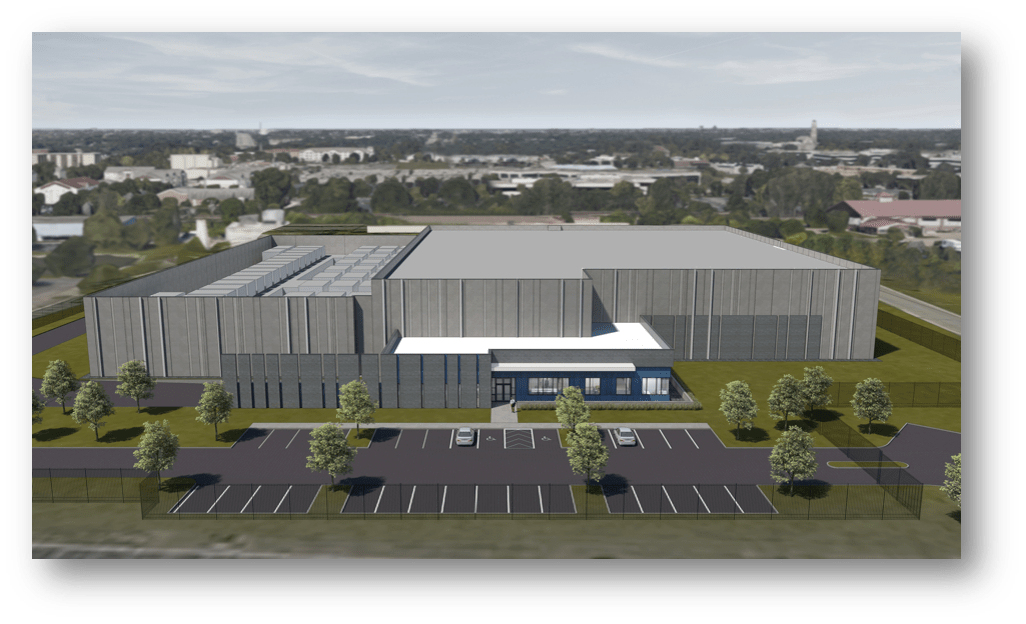
Cololgix datacenter has been in the Columbus area for many years and operates 27 network neutral datacenters in North America. Its newest facility, COL3, is the largest multi-tenant datacenter in Columbus and resides on the same 8-acre campus as their existing datacenters COL1 and COL2. It offers over 50 network service providers including the Ohio-IX Internet Exchange peering connection.

Most exciting of all is its 20+ cloud service providers, which includes a direct connection to the market leading Amazon Web Services (AWS). This is the first AWS direct connection in the region providing customers with low latency access to AWS US East Region 2. With direct connect AWS customers create a dedicated connection to the AWS infrastructure in their region. When AWS is in the same datacenter where your IT infrastructure resides, such as Cologix, all that is needed for connectivity is a small cross connect fee.

Here are some pertinent specifications of Cologix COL3:

Facility

    • Owned & operated in a 200,000+ SQF purpose-built facilities on 8 acre campus
    • Rated to Miami-Dade hurricane standards
    • 4 Data Halls – Up to 20 Milliwatt (MW)
    • 24” raised floor with anti-static tiles
    • 150 lbs/SQF floor loading capacity with dedicated, sunken loading deck

Power:

  • 2N Electrical, N+1 Mechanical Configurations
  • 2N diverse feeds from discrete substations
  • Redundant parallel IEM power bus systems serve functionality and eliminate all single points of failure
  • 2N generator configuration- Two (2) MW Caterpillar side A and Two (2) MW Caterpillar side B
  • On-site fuel capacity for 72 hours run time at full load
  • Redundant 48,000-gallon tanks onsite, priority refueling from diverse supplies & facility exemption from emergency power

Cooling:

  • Raised floor cold air plenum supply; return air plenum
  • 770 tons per Data Hall cooling capacity
  • Liebert, pump refrigerant DSE
  • Concurrently maintainable, A &B systems

Network:

  • 50+ unique networks in the Cologix-controlled Meet-Me-Room
  • Network neutral facility with 16+ fiber entrances
  • Managed BGP IP (IPv4 & IPv6); multi-carrier blend with quad-redundant routers & Cologix provided customer AS numbers & IP space
  • Most densely connected interconnect site in the region including dark fiber network access
  • Connected to the Columbus FiberNet system plus fiber feeds reaching all 88 Ohio counties
  • Metro area dark fiber available


If you would like to learn more or visit COL3 please contact us at:

Jim Conwell (513) 227-4131      jim.conwell@twoearsonemouth.net  
www.twoearsonemouth.net


What is a Software Defined Wide Area Network (SD-WAN)

sdwan2

image courtesy of catchsp.com

The trend for software or applications to manage technology and its processes has become commonplace in the world of enterprise IT.  So common, in fact, that it has created its own prefix for IT solutions, Software Defined or SD. Virtualization software from companies like VMware revolutionized the way the enterprise built datacenters and coined the phrase “software defined network”. Today this concept has expanded out from the corporate datacenter to the Wide Area Network (WAN), and ultimately to the enterprise branch offices and even to customers. The Software Defined WAN (SD-WAN) can simplify management of the WAN and significantly reduce the cost of the telecommunication circuits that create the WAN.

What’s a WAN?

A Wide Area Network, or WAN, allow companies to extend their computer networks to connect remote branch offices to data centers and deliver the applications and services required to perform business functions. Historically, when companies extend networks over greater distances and sometimes across multiple telecommunication carriers’ networks, they face operational challenges. Additionally, with the increase of bandwidth intensive applications like Voice over Internet Protocol (VOIP) and video conferencing, costs and complications grew. WAN technology has evolved to accommodate bandwidth requirements. In the early 2000’s Frame Relay gave way to Multi-Protocol Label Switching (MPLS). However, MPLS technology has recently fallen out of favor, primarily because it has remained a proprietary technology.

Why SD-Wan?

MPLS, a very mature and stable WAN platform, has grown costly and less effective with age. The business enterprise needs to select one MPLS vendor and use them at all sites. That MPLS provider needs to look to a local telecom provider to provide the last mile to remote branches and possibly even the head end. This has historically brought unwelcomed blame and finger pointing as the circuit develops troubles or is out of service. It also creates a very slow implementation timeline for a new site. MPLS solutions are typically designed with one Internet source at the head end that supports the entire WAN for Web browsing. This will create a poor internet experience for the branch and many trouble tickets and frustrations for the IT team at the head end. SD-WAN can eliminate these problems unless it isn’t designed correctly, in which case it has the potential to create problems of its own.

SD-WAN uses broadband internet connections at each site for connectivity. The software component of the solution (SD) allows for the management and monitoring of these circuits provided by multiple vendors. The broadband connections are ubiquitous and inexpensive, provided by local cable TV providers. Broadband internet connections offer more bandwidth and are much less expensive than an MPLS node. Additionally, broadband circuits can be installed in weeks instead of the months required for a typical new MPLS site. In an SD-WAN deployment, each site has its own internet connectivity, the same broadband circuit that is delivering connectivity. This greatly increases the satisfaction of the branch users for internet speed and reduces total traffic over the WAN. However, it creates a challenge for the cyber security of the enterprise. When each remote site has its own internet, each site needs its own cyber security solution. Producing a valid cyber security solution can reduce the cost savings that result from the broadband internet.

Gartner recently has labeled SD-WAN as a disruptive technology due to both its superior management of a WAN and its reduced costs. Implementation of an SD-Wan implementation requires a partner with expertise. Some providers today pride themselves on having the best database to find the cheapest broadband circuits for each site. However, it is vital to pick a partner that also can provide an ongoing management of the circuits at each site and a deep understanding of the cyber security risks of an SD-WAN solution.

If you need assistance designing your SD-WAN Solution please contact us at:

Jim Conwell (513) 227-4131      jim.conwell@outlook.com      www.twoearsonemouth.net

#sdwan #sd-wan


Disaster Recovery as a Service (DRaaS)

draas img

One of the most useful concepts to come from the “as a service” model that cloud computing created is Disaster Recovery as a Service (DRaaS). DRaaS allows the business to outsource the critical part of their IT infrastructure strategy that assures the organization will still operate in the event of an IT outage. The primary technology that has allowed Disaster Recovery (DR) to be outsourced, or prosed as a service, is virtualization. DRaaS providers operate their own datacenter and provide a cloud infrastructure where they will rent servers for replication and recovery of their customer’s data. DRaaS solutions have grown in popularity partly because of the increased need for small and medium (SMB) sized business’s IT strategy to include DR.  DR plans have become mandated by the larger companies, who the SMB supply services to, as well as insurers or regulatory agencies. These entities require proof of the DR plan and of the ability to recover quickly from an outage.  It’s a complicated process that few organizations take the proper time to address. A custom solution for each business needs to be designed by an experienced IT professional that focuses on cloud and DR. Most times an expert such as Two Ears One Mouth Consulting partnered with a DRaaS provider will create the best custom solution.

The Principles and Best Practices for Disaster Recovery (DR)

Disaster Recovery (DR) plans and strategies can vary greatly. One extreme notion is the idea that “my data is in the cloud, so I’m covered”. The other end of the spectrum is “I want a duplication of my entire infrastructure off site and replicated continually”, an active-active strategy. Most businesses today have some sort of backup; however, backup is not a DR plan. IT leadership of larger organizations favor the idea of a duplicated IT infrastructure like the active-active strategy dictates but balk when they see the cost. The answer for your company will depend on your tolerance for an IT outage, how long you’re willing to be off-line, as well as your company’s financial constraints.

First, it’s important to understand what the primary causes of IT outages are. Many times, we consider weather events and the power outages they create. Disruptive weather such as hurricanes, tornadoes and lightning strikes from severe thunder storms affect us all. These weather-related events make the news but are not the most common causes. Human error is the greatest source of IT outages. This type of outage can come from failed upgrades and updates, errors by IT employees or even mistakes from end users. Another growing source of IT outages is malware and IT security breaches (See the previous article on Phishing). Ransomware outages require an organization to recover from backups as the organization’s data has been encrypted and will only be unlocked with a ransom payment. It is vital that security threats are addressed, understood and planned for in the DR recovery process.

Two important concepts of DR are Recovery Point Objective (RPO) and Recovery Time Objective (RTO). RPO will detail the interval of time that will pass during an outage before reaching the organization’s tolerance for data loss. The RPO concept can be used for a ransomware attack, described above, to fallback to data for a time before the breach. More often RPO is used to define how long the customer is willing to go back in time for the data to be restored. This determines the frequency of the data replication and ultimately the cost of the solution.  The RTO defines the amount of time the vendor will have the customer up and running on the DR solution in an outage and how they will “fallback” when the outage is over.

If the company is unable to create an active-active DR solution, it is important to rate and prioritize critical applications. The business leadership needs to decide what applications are most important to the operations of the company and set them first to recover in a DR solution. Typically these applications will be grouped in “phases” as to the priority of importance to the business and order to be restored.

Telecommunications networking can sometimes be the cause of an IT outage and is often the most complicated part of the recovery process. Customers directed to one site in normal circumstances need to be changed to another when the DR plan is engaged. In the early days of DR, there was a critical piece of documentation called a playbook. A playbook was a physical document with step-by-step instructions detailing what needs to happen in the event of an IT outage. It would also define what is considered a disaster, and at what point do we engage the DR plan. Software automation has partially replaced the playbook; however, the playbook concept remains. While automating the process is often beneficial there are steps that can’t be automated. Adjusting the networking of the IT infrastructure in the event the DR plan in imitated in one example.

Considerations for the DRaaS Solution

DRaaS like other outsourced solutions has special considerations. The agreement with the DraaS provider needs to include Service Level Agreements (SLAs). SLA’s are not exclusive to DRaaS but are critical to it. An SLA will define all the metrics you expect your vendor to attain in the recovery process. RTO and RPO are important metrics in an SLA. SLA’s need to be in writing and have well defined penalties if deliverables are not met. There should also be consideration for how the recovery of an application is defined. A vendor can point out the application is working at the server level but may not consider if it’s working at the desktop and at all sites. If the customer has multiple sites, the details of the networking between sites is a critical part of the DR plan. That is why a partner that understands both DR and telecommunications, like Two Ears One Mouth IT Consulting, is critical.

The financial benefits of an outsourced solution such as DRaaS are a primary consideration. To make a CapEx purchase of the required infrastructure that will be implemented in a remote and secure facility is very costly. Most businesses see the value of renting the infrastructure for DR that is already implemented and tested in a secure and telecom rich site.

DR is a complicated and very important technology that a business will pay for but may never use. Like other insurance policies, it’s important and worth the expense. However, it’s complicated it should be designed and executed by professionals which may make an outsourced service the best alternative.

If you need assistance designing your DR Solution (in Cincinnati or remotely), please contact us at:

.Jim Conwell (513) 227-4131      jim.conwell@outlook.com      www.twoearsonemouth.net

cloud savings

Financial Benefits of Moving to Cloud

Cloud-$

                                                                                                 image courtesy of betanews.com

There are many benefits that cloud technology can offer a business, however, business doesn’t buy technology for technology’s sake, it buys it for positive business outcomes. The two most popular business outcomes desired by most businesses are to increase revenue and reduce cost. Information Technology (IT) has long been known to be one of the costliest departments in a business. So it makes sense, if we’re going to recommend to a cloud solution, we look at the financial benefits. The financial advantages paired with the expertise in determining what applications should migrate to the cloud create a cloud strategy. This consultation is not completed just once but needs to be completed periodically by a strategic partner like Two Ears One Mouth.   Just as telecommunications and internet circuits can get financially burdensome as a business grows, so can a cloud solution. Telecom cost recovery became a financial necessity for businesses when telecom costs spiraled out of control. A consultant would examine all the vendors and circuits to help the business reduce IT spend by eliminating waste. The cloud user faces a similar problem, as cloud services can automatically grow as demand increases. The growth will include the cloud solutions cost as well as the resources.


To follow are the three primary financial benefits of a cloud migration.


CapEx vs OpEx

The primary financial benefit most organizations plan for with their first cloud implementation is the benefit of an operational expense (OpEx) instead of a capital expense (CapEx). This is particularly beneficial for startup companies and organizations that are financially constrained. They find comfort from the “pay as you go model” similar to other services they need, such as utilities. Conversely, enterprises that invest in equipping their own data centers have racks of equipment that depreciate quickly and utilize a fraction of the potential purchased. It has been estimated that most enterprises have an IT hardware utilization rate of about 20% of its total capacity. Cloud services allow you pay only for what you use and seldom pay for resources sitting idle.


Agility and scale

Regardless of the size of your business, it would be financially impractical to build an IT infrastructure that could scale as quickly as the one you rent from a cloud provider. This agility allows businesses to react quickly to IT resource needs while simultaneously reducing cost.  Many cloud solutions can predict when additional resources are needed and are able to scale the solution appropriately. This provides obvious benefits for the IT Manager but can create problems with the IT budget. If the cloud solution continues to scale upward, and it is billed transitionally, the cost can escalate quickly. Cloud instances need to be monitored constantly for growth and cost. For this reason, Two Ears One Mouth consultants have developed a product known as cloud billing and support services (CBASS). CBASS makes sure the benefits originally realized with the cloud migration remain intact.


Mitigate risk

Many best practices in setting up a cloud infrastructure also enhance IT security. For instance, because your data resides elsewhere, cloud users tend to implement data encryption.  This encryption can include not only the data that rests in the cloud providers datacenter but also as it’s in transit between the datacenter and the customer. This is a wise practice for IT security. It can eliminate data breaches and benefit regulatory compliance in some cases. Additionally, security software and hardware, such as a firewall, tend to be superior in larger IT datacenters, such as with a cloud provider. Ironically, IT security which started as a concern of cloud computing, has become an advantage.


Cloud technology has long been a proven technology and is here to stay. It has reduced IT budgets while enhancing IT response time. However, the cost savings of cloud is not automatic and ongoing. Savings, as well as the solution, need to be measured and affirmed regularly. consultants can monitor your cloud environment leaving you to focus on the business.

If you need assistance with your current IT cloud project  please contact us at:

Jim Conwell (513) 227-4131      jim.conwell@outlook.com      www.twoearsonemouth.net