
cloud savings

Financial Benefits of Moving to Cloud

Cloud-$

                                                                                                 image courtesy of betanews.com

There are many benefits that cloud technology can offer a business, however, business doesn’t buy technology for technology’s sake, it buys it for positive business outcomes. The two most popular business outcomes desired by most businesses are to increase revenue and reduce cost. Information Technology (IT) has long been known to be one of the costliest departments in a business. So it makes sense, if we’re going to recommend to a cloud solution, we look at the financial benefits. The financial advantages paired with the expertise in determining what applications should migrate to the cloud create a cloud strategy. This consultation is not completed just once but needs to be completed periodically by a strategic partner like Two Ears One Mouth.   Just as telecommunications and internet circuits can get financially burdensome as a business grows, so can a cloud solution. Telecom cost recovery became a financial necessity for businesses when telecom costs spiraled out of control. A consultant would examine all the vendors and circuits to help the business reduce IT spend by eliminating waste. The cloud user faces a similar problem, as cloud services can automatically grow as demand increases. The growth will include the cloud solutions cost as well as the resources.


To follow are the three primary financial benefits of a cloud migration.


CapEx vs OpEx

The primary financial benefit most organizations plan for with their first cloud implementation is the benefit of an operational expense (OpEx) instead of a capital expense (CapEx). This is particularly beneficial for startup companies and organizations that are financially constrained. They find comfort from the “pay as you go model” similar to other services they need, such as utilities. Conversely, enterprises that invest in equipping their own data centers have racks of equipment that depreciate quickly and utilize a fraction of the potential purchased. It has been estimated that most enterprises have an IT hardware utilization rate of about 20% of its total capacity. Cloud services allow you pay only for what you use and seldom pay for resources sitting idle.


Agility and scale

Regardless of the size of your business, it would be financially impractical to build an IT infrastructure that could scale as quickly as the one you rent from a cloud provider. This agility allows businesses to react quickly to IT resource needs while simultaneously reducing cost.  Many cloud solutions can predict when additional resources are needed and are able to scale the solution appropriately. This provides obvious benefits for the IT Manager but can create problems with the IT budget. If the cloud solution continues to scale upward, and it is billed transitionally, the cost can escalate quickly. Cloud instances need to be monitored constantly for growth and cost. For this reason, Two Ears One Mouth consultants have developed a product known as cloud billing and support services (CBASS). CBASS makes sure the benefits originally realized with the cloud migration remain intact.


Mitigate risk

Many best practices in setting up a cloud infrastructure also enhance IT security. For instance, because your data resides elsewhere, cloud users tend to implement data encryption.  This encryption can include not only the data that rests in the cloud providers datacenter but also as it’s in transit between the datacenter and the customer. This is a wise practice for IT security. It can eliminate data breaches and benefit regulatory compliance in some cases. Additionally, security software and hardware, such as a firewall, tend to be superior in larger IT datacenters, such as with a cloud provider. Ironically, IT security which started as a concern of cloud computing, has become an advantage.


Cloud technology has long been a proven technology and is here to stay. It has reduced IT budgets while enhancing IT response time. However, the cost savings of cloud is not automatic and ongoing. Savings, as well as the solution, need to be measured and affirmed regularly. consultants can monitor your cloud environment leaving you to focus on the business.

If you need assistance with your current IT cloud project  please contact us at:

Jim Conwell (513) 227-4131      jim.conwell@outlook.com      www.twoearsonemouth.net
Online Business Communication Tools

online-business-toolsimage courtesy of Phoenix One Sales

One major advantage Small and Medium Businesses (SMB) have today over their predecessors are the communication tools which are available. Often these come at little or no cost, and can be purchased and delivered over the internet. Theses cloud based platforms enable SMB to run more efficiently and compete better with their rivals in large organizations. Several years ago, if a company wanted an enterprise class email platform the choices were very limited. By far, the most popular choice would be to implement a Microsoft Exchange email server. Exchange email has major advantages over the typical business email account or personal email services that small businesses relied on. Some of these include: shared calendars with meeting invitations, virtually unlimited email archiving and storage, customizable folders for organization purposes and the ability to have the email address with the business name or domain (me@mycompany.com). However, these valuable features came at a very high cost. The business first had to purchase the Exchange server licenses and the client access licenses (CALS) and then the server hardware, with plenty of RAM and storage to satisfy Exchanges resource requirements. Finally, and most costly of all, is the person who will implement and administer the Exchange server. The administrator of an exchange server is a highly paid resource that the enterprise will come to depend on 24 hours a day,7 days a week, 365 days a year. These costs previously prohibited smaller businesses from purchasing Exchange, or any other enterprise email solutions.

When Microsoft introduced Office 365, the pricing model changed dramatically, the cloud based Software as a Service platform provided email in addition to their popular business applications.  No server hardware was required, and licensing was much simpler and less expensive. An administrator was still required to add and delete email accounts, but it didn’t require the expertise to manage the hardware or the Exchange server software. Additionally, if selected, it may include up to date licenses for Office products, Word, Excel, PowerPoint and Outlook. This solved another problem for the IT manager: different licenses and versions among users for Office applications. With an Office 365 license, a user can download the current version at any time. All of this has allowed smaller companies to have the advantage access to the same level of technology of their larger rivals. Office 365 was priced in a way that made it a “no-brainer” to business with either 5 users or 50,000 users.

In this part 1 of this article, I will describe the different components of Office 365 and pricing of some of their more popular bundles for SMB. In the following post I will list and describe Office 365’s competitors as well as packages that can complement your communications strategy.

Office 365 includes bundled services as well as additional packages that can be added in a’ la carte fashion. Below in figure 1 are a couple of the most popular bundles for SMB and their cost as of the time of this post.

o   Outlook/Exchange email account- Microsoft Exchange has become the standard for email service with all the features mentioned above. Each Office 365 license offers access for up to 5 devices including tablets, phones PCs and MACs.

o   Office Applications- Bundles include the most recent versions of Microsoft’s most popular applications including Word, Outlook, Excel, PowerPoint, One Note and Access. All of these can be updated by each user as Microsoft releases new versions.

o   Web Apps- These web versions of the above applications can be used in tandem with, and stored on, One Drive. This allows users to view and edit documents without a bundle that includes the Office applications.

o   One Drive- A secure cloud storage platform where files can be stored and shared. Bundles including One Drive include at least One Terabyte of data. Business accounts supporting multiple users, a common One Drive account is provided to support SharePoint.

o   SharePoint- A common file sharing platform for documents used by employees as well as customers. Some organizations use it so their customers are able to download brochures or other documents.

o   Yammer- An internal communication and social media platform.

o   Skype for Business- A video and voice conferencing platform. It can be used for specific applications such as webinars or a voice and video conferencing bridge which can connect up to 250 people.

o   Voice over IP (VOIP) phone services- These phone services used in the Skype platform and provided through the Enterprise E5 bundle. E5 will provide everything their enterprise would expect from a VOIP PBX including direct dial numbers, call plans and voicemail with unified messaging. Unified messaging organizes all messaging types, voicemail, email and fax, in one Outlook inbox.

o   Power BI Pro- Advanced personal and organizational analytics with MyAnalytics and Power BI Pro.

Just as it was difficult to compete with Microsoft on their operating system server platforms and Office applications, Office 365 is the leader in these technologies. In my follow-up post, I will describe platforms that compete with Office 365 as well as other applications that look to complement Office 365.

figure 1- the most popular Office 365 bundles for SMB

O365O365-2

Are Containers the Forecast for Cloud?

image courtesy kubernetes.io

One of the most exciting and simultaneously challenging things about working in technology is the speed at which change occurs. The process from a cutting-edge technology to a ubiquitous and commoditized product can happen in the blink of an eye. Now that the cloud has made its way into all sizes and types of business the next related technology has emerged: containers. So it is fair to ask; Are Containers the forecast for cloud?

How we got to this port

VMware’s introduction of virtualization was thought by many to be the predecessor of cloud as we know it today. This revolutionary technology allowed early adopters to reduce costs and enhance their IT agility through virtualization software. The day of physical servers for each application are over. Cloud technology has evolved from a single software for the enterprise, to an outsourced product that is provided to businesses such as major technology institutions like Amazon, Microsoft, and Google. Most recently, containers have evolved as a next step for cloud and are largely developed to suit the needs of software developers.
The difference between Virtual Machines (VM’s) and Containers
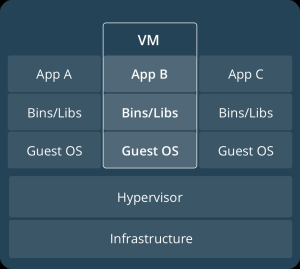
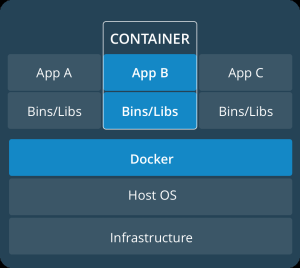
A container is defined by Docker as a stand-alone executable software package that includes everything needed to run an application: code, runtime, system libraries and settings. In many ways, that sounds like a VM. However, there are significant differences. Above the physical infrastructure, a VM uses a hypervisor to manage the VMs. Each VM has their own guest operating system such as Windows or Linux (see image #1). A container uses the host operating system and the physical infrastructure which supports the container platform such as Docker. Docker then supports the binaries and libraries of the applications. Containers do a much better job of isolating applications from its surroundings and this allows the enterprise to use the same container instance from development to production.


(Image 1)                                                            (Image 2) Images courtesy of docker.com

How can Containers be used in the Enterprise today?

Docker is currently the most popular company driving the movement for container based solutions in the enterprise. The Docker platform enables independence between applications and infrastructure allowing the applications to move from development to production quickly and seamlessly. By isolating software from its surroundings, it can help reduce conflicts between teams running different software on the same infrastructure. While containers were originally designed for software developers, it is becoming a valuable IT infrastructure solution for the enterprise.
One popular platform allowing the enterprise to benefit from container technology is Kubernetes. Kubernetes is an opensource system originally designed by Google that was donated it to the Cloud Native Computing Foundation (CNCF). Kubernetes assists with three primary functions in developing containers: deployment, scaling and monitoring. Finally, open source companies such as Red Hat are developing products to help utilize these tools and simplify containers for all types of business. OpenShift, designed by Red Hat, is a container application platform that has helped simplify Docker and Kubernetes for the business IT manager. The adoption of new technology, such as cloud computing, often takes time to be accepted in the enterprise. Containers seem to be avoiding this trend and have been accepted and implemented quickly in businesses of all types and sizes.

COMPLIANCE, SECURITY AND GOVERNMENT REGULATION Can your business stay current?

compliance

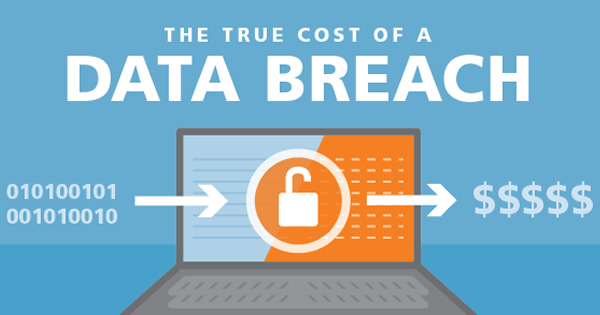
In this time of IT security breaches, businesses of all sizes have become aware of the consequences of not having a solid IT framework and security policy. What previously was a concern for only large enterprises has now become a challenge all businesses share. Government regulation, such as the Health Insurance Portability and Accountability Act (HIPAA), have mandated compliance for the security of Protected Health Information (PHI) for any size of enterprise that stores PHI. A recent trend has been for large enterprise to relay their compliance and security requirements downstream to their suppliers which may be smaller businesses. One of the initial causes for this was the Target breach. Target, who was fully compliant with their regulatory environment,[1] (PCI DSS), was breached through an HVAC vendor. This Target business partner was primarily responsible for compromising credit card information for millions of its customers and causing large scale damage to Target’s finances and reputation. To learn more about the total cost of a data breach please see my previous article: https://twoearsonemouth.net/2017/11/22/preparing-for-the-cost-of-a-data-breach/ .

In addition to government regulation, industry associations have aligned to create a compliance standard for their data. One primary example of this is the PCI DSS previously mentioned above in regard to Target. PCI DSS develops a robust payment card data security process — including prevention, detection and appropriate reaction to security incidents. The PCI Security Standards Council originates the standards for compliance to all credit card information as well as an approved list of assessors who audit and validate an entity’s adherence to PCI DSS.

Businesses are not completely on their own to navigate through this complex regulatory and IT security environment. There have been a series of IT frameworks developed that an organization can use to reach their goals. These frameworks describe IT “best practices” which are written in general terms. Typically, businesses use them as a reference to achieve regulatory or security compliance. Below are some examples of the most common IT frameworks available today:

  • COBIT– A framework designed by Information Systems Audit and Control Association (ISACA) to provide management and business process owners with an IT governance model that aids in delivering value from IT and understanding the management of risk associated with IT.
  • ISO 27002– An IT security standard originated and maintained by the International Organization for Standardization (ISO) and the International Electro Technical Commission. (IEC)
  • ISO 38500– Similar framework to ISO 27002 for IT used by management and originated and maintained by the International Organization for Standardization (ISO) and the International Electro Technical Commission. (IEC)

IT security best practices at the highest level can be classified in 3 categories; physical safeguards, administrative safeguards and technical safeguards. Below is a brief description of each.

Physical Safeguards are tools such as alarm systems (video), key card systems, secure locks for offices and drawers where laptops and phones are stored, a guard or receptionist always at the front door and a secure IT server room.

Administrative Safeguards are processes that include creating a security officer and/or department, creating training programs to make all employees aware of what data needs to be protected and how it is protected, a company policy for storing and archiving of protected data and business continuity policies.

Technical Safeguards are IT tools such as Unified Threat Management (UTM) and Next-Gen firewalls, malware and virus protection software on servers and workstations, encryption of data in transit and at rest and a strong Business Continuity and Disaster Recovery (BCDR) plan that is tested on a regular basis.

Following these principles and best practices not only help to achieve a business mitigate risk  but also make good business sense.


Contact us so that we may learn more about the IT challenges within your organization. We will provide an initial consult at no cost! We can provide best in class IT Project Management in Cincinnati or remotely.

Jim Conwell (513) 227-4131      jim.conwell@outlook.com      www.twoearsonemouth.net
[1] PCI DSS is an acronym for Payment Card Industry Data Security Standard. PCI DSS is an industry based regulatory authority for the credit card industry.

above image courtesy of RF IDeas

Preparing for the Cost of a Data Breach

Cost-of-Breach

One of the biggest challenges, particularly for small and medium businesses (SMB), is trying to anticipate and budget for the cost of a data breach. While larger, often publicly owned, corporations can sustain huge financial losses to litigation or regulatory penalties, organizations with less than $100 million in revenue cannot. Even with the leadership of the SMB becoming aware of the inevitability of an attack, they don’t understand what the potential costs could be and how to prepare for them. This may cause them to task their Chief Information Officer (CIO) or Chief Information Security Officer (CISO) to estimate the cost of a breach for budgetary purposes. The CISO, understanding that addressing the breach issue starts with IT governance, may attempt to educate their company’s leadership on the tools necessary to help to prevent a breach. Both leaders face a difficult decision: what monies are put aside for data security and do we focus on prevention or recovery? Most would agree the answer is a combination of the two: for this exercise I will focus on the components of cost once the data breach has occurred. The four primary silos of cost are response and notification, litigation, regulatory fines and the negative impact to reputation. When the affected enterprise forecasts costs for a potential breach, it not only gives the company an idea of the financial burden it will incur but it also helps those affected to consider documenting the steps to take in the event a breach is discovered.

Notification, the first cost incurred, is the easiest to forecast. Most businesses have a good idea of who their customers are and how best to notify them. A good social media presence can simplify this as well as reduce total costs. After the breach is discovered, the first task is to try to discover which customers were affected. Once that is determined, the business needs to decide the best way to notify them. US Mail, email or social media are the most common methods. The most efficient process for each must be determined. Many states have laws around breach notification and timing, which need to be considered and understood as a part of the process. The larger the organization, and the associated breach, the more complicated this process becomes. In a recent breach of a large healthcare organization, deciding how to contact the affected customers took longer than it should have because the company wasn’t prepared for a breach of the magnitude they faced. The breach affected tens of millions of customers. It was decided that a conventional mail notification was required at a cost of several million dollars!

Litigation and regulatory penalties are similar and can be prepared for in the same way. While regulatory penalties can be better estimated up front, both costs can get out of control quickly. The best way to prepare for these types of costs are with Data Breach Insurance, also known as Cyber Liability Insurance. Cyber Liability Insurance provides coverage for the loss of both first-party and third-party data. This means that whether the data breach happens directly to your company or to a company whose data you are working with, the coverage will be in effect. While most of the time Cyber Liability Insurance is considered for the larger expenses, like lawsuits and regulatory penalties, the right plan can be used for all four types of aforementioned costs: notification, litigation, regulatory fines and damage to reputation.

The hardest to define, and many times the costliest, is the damage to the breached company’s reputation. In a recent study, the three occurrences that have the greatest impact on brand reputation are data breaches, inadequate customer service, and environmental disasters. Of these, the survey found that data breaches have the most negative impact on reputation. If the affected company is in the IT industry, and specifically IT security, the effects are likely to be devastating to the organization. The only trend that seems to be softening that damage is that breaches have become so common that people are more likely to disregard the notification. Greater frequency certainly is occurring, but it isn’t anything the affected company can include in their plan. What you must include in your plan is the message you will communicate with the public to lessen the negative consequences. This should include how you fixed the problem and how you plan to prevent additional breaches in the future. In a recent healthcare breach, the organization partnered with a well-known security platform to better protect patient records going forward.

Considering these four primary areas affected is critical to helping leadership determine the costs associated with a data breach. If you have any questions about determining the cost for your business, contact us today.

Contact us so we can learn more about the IT challenges with your organization.

.Jim Conwell (513) 227-4131      jim.conwell@outlook.com      www.twoearsonemouth.net

From Meaningful Use to MACRA or… When the MIPS comes Down?!

mips_

Most of us who have been in the business of healthcare for 5 years or more are familiar with the term “Meaningful Use.” For others, let me define “Meaningful Use” at it will serve as the basis for this blog. Meaningful Use was a program implemented by the governmental agency, “Centers for Medicare and Medicaid Services” (CMS) to measure and reward medical practices for the use of Electronic Health Record (EHR) technology. EHR is the software a medical practice uses to manage its business and store all Protected Health Information (PHI). I believe Meaningful Use was a success. It brought a much greater awareness to EHR technologies, and pushed practices small and large to evolve, and store their PHI electronically. Storing information electronically in turn allowed medical practices to provide a better level of service, care coordination and sensitive data security to its patients.

You may have noted I used 3 three letter acronyms (TLAs) in the first paragraph. This comes with working with information technology and is multiplied by government bureaucracy.   There are plenty more to come, so I will document the rest up front, right now! 

1.    MACRA- Medicare Access and Chip Reauthorization Act

2.    QPP- Quality Payment Program

3.    APM- Alternative Payment Model

4.    MIPS- Merit-Based Incentive Payment System

5.    EC- Eligible Clinician

The next year brings the sequel to Meaningful Use, MACRA and the payment system within it: MIPS. The QPP final rules were posted on November 2, 2017 giving participants two months before reporting starts on January 1, 2018. Nearly all healthcare providers, physicians, physician assistants and nurses must participate. The scoring for MIPS will be based on a point system, look for future BLOG’s to take a deeper dive on MIPS including the point system.

A practice that bills Medicare Part B* claims in an amount less than $90,000 or has fewer than 2,000 Medicare claims is not required to participate. The smaller practices that do report receive some breaks; groups from 1-15 clinicians get an automatic 5 points, even if completing the minimum amount of reporting. Groups of 1-10 clinicians can team up with other smaller groups to combine reporting, regardless of location or specialty. This will allow some “rock-star” practices to report with lesser groups allowing all to benefit from the payment program.

MIPS reporting for 2018 will be divided into 4 categories, each of which will have a different weighting. Additionally, the weighting percentages are set to change in years 2019 and 2020. The following are the four reporting categories and their weights:

  1. Quality (60%) – The practice selects at least 6 measurement criteria to report on from a choice of over 300. Some are general categories and some are for specialty practices. For example, a cardiologist may report on measurements for controlling high blood pressure among all their patients. Quality is the only category that must be reported on for the entire year.
  2. Advancing Care Information (25%) – ACI includes all the measurements that were a part of Meaningful Use. It measures how the practice promoted patient engagement (patient portal) and exchanged information using EHR technology.
  3. Improvement Activities (15%) – The primary focus on Improvement Activities will be on care coordination, which is the ability to work seamlessly with other providers. Additionally, providers will have a list of over 900 categories and 9 sub-categories to report on.
  4. Cost (no mandated reporting in 2018) – This information will be based on data from Medicare claims received.

MIPS reporting options for 2018 

  • Option 1 – Submit “some data”- Quality is the only data that must be reported for the entire year. Enough data for 15 points must be reported.
  • Option 2 – Quality full year – Submit Quality full year, Advancing Care Information and Improvement Activities for 90 days.
  • Option 3 – All categories full year- Cost not reported in 2018

A practice can pick any of the options they choose, most likely it will be driven by their understanding of the program and the resources they assign to it.

More will be revealed on MACRA, MIPS and the best practices for reporting in the coming months. Due to the consequences of failing to report, and the urgency of a short preparation period, many healthcare organizations will need assistance with reporting. MIPS has much greater consequences than Meaningful Use.

First, all information submitted for reporting will be public. We will see reported information on CMS websites allowing you to compare providers, like we look at online reviews for traditional business today. Secondly, MIPS does more than just reward compliant practices, it also penalizes non-compliant ones. Meaningful Use was initiated as an experiment to some extent. MIPS seems to be making the transition to a regulation that is here to stay. Healthcare organizations will either need to get on board or face serious consequences.

Given the importance of MIPS to the healthcare industry, and the continued flow of information to this day, we will provide another update to this before year-end. Please look for a deeper dive on MIPS information including components not covered here, like how the points system works and Alternate Payment Methods (APM), that will become more important in the years to come.

*Medicare Part B is the portion of Medicare that pays for ambulatory services such as doctor office visits and prescriptions. Part A applies to hospital stays.


To meet and learn more about how MIPS reporting can affect your organization contact me at
 (513) 227-4131 or jim.conwell@outlook.com.

What’s a Managed Service Provider (MSP)?


AAEAAQAAAAAAAAwgAAAAJDAxNmMxNDJhLTM0MWEtNDIwZi1iNDBiLTAwYjVhZTYzMzM4Mw[1]

Most organizations, big and small, have gone through this exercise with Information Technology, as well as other services. “Should I hire a dedicated person, assign it to someone in the organization as an additional responsibility or outsource”? What’s a Managed Service Provider (MSP)?  When posing this question for IT services; size matters! In this exercise, we will assume there are from between 20 to 100 IT users in the organization considering an MSP.

Size Matters

When a company I consult with is near the lower end of this user count many times they will tell me that an employee’s relative; brother, sister or husband does their IT work. I call this type of IT provider a trunker, as their office and tools are in the trunk of their car. A trunker can be a smart way to go, receiving a prompt and personalized service response. However; it is important the trunker has a way to stay current with technology. Also, at least one employee of the organization be aware of all he or she does and documents all passwords and major tasks.

 I’ve seen the same level of service can be achieved with an IT MSP as the organization outgrows the trunker. The MSP will typically have an upfront cost to inspect and become familiar with the IT infrastructure. Then there will be a recurring charge, monthly or quarterly, for help-desk support that is either handled remotely or on the customers site. With few exceptions, organizations of 100 employees or less, are serviced satisfactorily with a remote agreement. When an issue calls for onsite service they will pay the predetermined labor rate. Another factor that is determined up front are Service Level Agreements (SLA’s). SLA’s will define how quickly the MSP will respond. As it was with the trunker mentioned before it’s up to the organization to keep track of the IT provider and their tasks. This can be made easier by the fact that an MSP, because it will engage multiple technicians for one customer, needs to document everything for their own benefit.

Why Use an MSP for My Business?

The MSP is the system I see work most often. So let me answer my original question. Why outsource my I.T?!

1)   Consistency and predictability of service. Based on the MSP’s reputation and the SLA’s provided most organizations experience responsive and high continuity of service. When the agreement ends, they can expect a smooth transition to the new vendor or person. I have witnessed many times when the trunker provider relationship ends poorly. The organization can be put in a position of having no documentation and not even knowing the passwords to access their systems.

2)   Transparency. Most MSP’s, as a part of their service, offer dashboards showing real-time status of devises on the network. Many even offer your business remote access to monitor your network. This is a major cost reduction based the cost to host or maintain monitoring yourself.

3)   Expertise. There is knowledge in numbers. Although you may only see or speak with one person as the face of your IT partner, you’re working with a team with vast experience and knowledge. The technical staff of an MSP will always have greater level of experience and a better knowledge of the trends in technology. This is particularly true in regulated organizations such as in healthcare and financial businesses.

Contact us for a free analysis of your business and what will serve it best.

Jim Conwell     (513) 227-4131     jim.conwell@twoearsonemouth.net http://www.twoearsonemouth.net